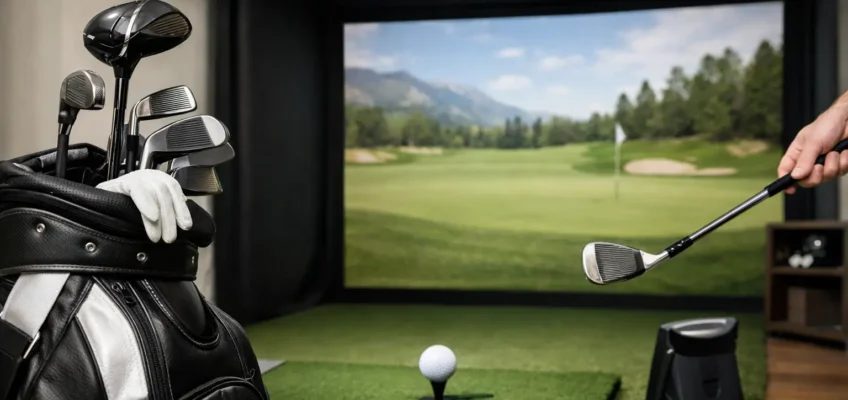
Golf Simulator Buying Guide for Better Home Play
A golf simulator can turn an underused basement, garage, bonus room, or commercial bay into a place to practice with purpose. But the best setup is not always the one with the largest screen or the longest feature list. It is the one that fits your available space, playing goals, household tolerance for noise, and expectations for accuracy over years of use.
For a premium purchase, the details matter. Launch monitor technology, hitting-mat quality, software subscriptions, ball containment, and installation requirements all influence whether your simulator becomes a favorite part of the home or an expensive system that is rarely switched on.
Start With the Way You Plan to Use It
Before comparing brands or packages, decide what success looks like. A golfer working on swing path and club delivery needs dependable data and repeatable feedback. A family that wants Friday-night rounds at famous courses may place more value on graphics, multiplayer options, and a forgiving, easy-to-use interface. A teaching professional or commercial operator needs both: trusted measurements, reliable software, and hardware that can handle frequent sessions.
This distinction helps prevent overspending in the wrong category. A highly accurate launch monitor paired with minimal course software may be ideal for serious practice. On the other hand, a visually impressive entertainment setup can be outstanding value for a household that cares more about social play than launch-angle analysis.
It also pays to think beyond the primary user. If right- and left-handed players will share the system, make sure the launch monitor works from a centered hitting position or can be repositioned without turning every session into a reset. If children and guests will use it, prioritize durable components and straightforward controls.
Measure the Room Before You Shop
Space is the first nonnegotiable. A room can look large enough until a full driver swing meets a low ceiling, a light fixture, or a wall behind the player. Ceiling height is especially important. Many adults need roughly 9 to 10 feet of clear height to swing a driver comfortably, though taller golfers and more upright swings may require more.
Width and depth matter just as much. You need enough room for the golfer, the hitting area, the launch monitor, and safe clearance around the swing. A dedicated simulator room often benefits from about 12 feet of width and 15 feet of depth, but requirements vary widely by monitor type and whether you are building a compact practice bay or a full projected enclosure.
Do not measure only the finished room dimensions. Account for soffits, garage-door rails, ceiling fans, projectors, support poles, shelving, and the depth of the impact screen or net. A professional layout can make a modest room feel polished and practical, while a poorly planned large room can still feel cramped.
Garage, basement, or dedicated room?
Garages are often appealing because they provide depth and fewer concerns about a stray ball. They can also create issues with winter temperatures, dust, vehicle access, and floor leveling. Basements offer privacy and a finished-home feel, but ceiling height is frequently the limiting factor. A dedicated bonus room can provide the best long-term experience, particularly when the space is designed around projection, acoustics, and storage from the start.
If your dimensions are tight, a net-based setup with a portable launch monitor may offer more value than forcing a full enclosure into an unsuitable room. The right trade-off is one that keeps your swing natural and your equipment protected.
Choose Golf Simulator Accuracy That Matches Your Goals
Accuracy is one of the most important comparison points, but it is not a single specification. Different launch monitors capture ball and club data in different ways, using camera-based, radar-based, or overhead systems. Each approach has strengths depending on the room, intended use, and budget.
For most home golfers, reliable ball speed, carry distance, launch angle, spin, and shot shape are the foundation. Serious players may also want clubhead speed, attack angle, face angle, club path, impact location, and detailed dispersion reports. Those extra data points can be genuinely useful, but only when you know how you will use them.
Outdoor performance and indoor performance can differ. Some radar-based units need enough ball flight to read shots accurately, while camera-based systems may be more comfortable in tighter indoor spaces. Overhead monitors create a clean hitting area and work well for right- and left-handed play, but they are often a larger investment and may require professional installation.
Be realistic about calibration and setup. A monitor that delivers strong data after a simple alignment check may be a better fit for frequent household use than a technically advanced option that demands careful positioning every time. Consistency matters more than chasing a specification you will rarely use.
Do Not Treat the Hitting Mat as an Accessory
The hitting mat influences comfort, realism, and durability every time you swing. It deserves the same attention as the launch monitor. A thin, firm mat may be less expensive upfront, but repeated impact can be hard on wrists and elbows. Better mats provide cushioning while allowing the club to move through the turf more naturally.
Look for a stable base, replaceable hitting strips or inserts, and enough surface area for a natural stance. If you are building a polished simulator room, consider whether the mat will sit flush with surrounding turf. That detail improves both appearance and safety by reducing trip edges.
The same quality standard applies to the impact screen, net, enclosure, and frame. A screen should absorb repeated shots without excessive bounce-back or distracting noise. An enclosure should protect the room from mishits, especially when guests are playing. Premium materials cost more, but they can protect both your investment and the room around it.
Software Determines Whether You Keep Coming Back
The launch monitor captures the shot. The software determines much of the experience. Course libraries, practice ranges, skills challenges, multiplayer modes, data dashboards, and graphical quality can vary dramatically from one ecosystem to another.
Start by asking whether you want entertainment, improvement, or both. For practice, useful software makes it easy to review shot patterns over time, create distance gapping sessions, and focus on specific skills. For play, course variety, realistic ball behavior, reliable online competition, and easy player setup can make the system far more enjoyable for friends and family.
Pay close attention to the ongoing cost. Some platforms include basic software with the hardware, while advanced courses, data packages, or multiplayer features may require annual subscriptions. Neither approach is automatically better. A higher upfront price with fewer recurring fees may suit a buyer who plans to keep the system for many years. A lower initial investment can be sensible if you prefer the flexibility of choosing software as your needs change.
Also check compatibility before purchasing a projector, computer, tablet, or television. High-quality graphics may require a capable gaming PC, while other systems are designed to run more simply through an included display or mobile device. The full system cost is what matters, not the launch monitor price alone.
Build a Budget Around the Complete Setup
A golf simulator budget should include more than the primary hardware. Depending on the setup, you may need an impact screen or net, enclosure, projector, computer, flooring, turf, side protection, seating, lighting adjustments, electrical work, and installation. Subscription costs and eventual replacement parts should also be part of the decision.
A practical way to compare options is to separate must-haves from nice-to-haves. Accurate carry and spin data, safe ball containment, and a comfortable mat are often must-haves. Theater-style seating, custom cabinetry, upgraded lighting, and a larger screen can be added later if the room and budget allow.
For commercial environments, budget for downtime as well. Equipment that is slightly more expensive but easier to service, easier for customers to understand, and built for heavy use can offer better long-term value than a lower-priced package designed primarily for occasional home play.
Plan for Installation, Sound, and Daily Convenience
The most enjoyable simulators are easy to use on an ordinary weeknight. That means considering where clubs, balls, tees, and accessories will live; how quickly the projector and software start; and whether the space can stay set up between sessions.
Noise deserves attention, particularly in a basement or attached garage. Impact screens, mats, and hard floors can amplify sound. Acoustic panels, carpeted surfaces outside the hitting zone, and thoughtful room finishes can make the area more comfortable for everyone nearby.
Professional installation can be worthwhile when mounting an overhead monitor, fitting a custom enclosure, running electrical connections, or integrating a projector into a finished room. A clean installation protects performance and gives a premium space the refined appearance it deserves.
Shop for Long-Term Confidence
The right system balances performance with the reality of your room and routine. Read product specifications carefully, compare software and warranty coverage, and pay attention to shopper experiences from people using similar spaces. A package that looks impressive online is only a strong choice if it supports the kind of practice and play you will actually enjoy.
At LeisureShoppers.com, the goal is to make those comparisons easier by focusing on the factors that shape lasting satisfaction: accuracy, software, room fit, durability, and overall value. Choose thoughtfully, leave room for your needs to evolve, and your golf space can become one of the most rewarding places in the home.
